Who a construction website is for
A construction company website has more than one audience. Before you pick any design idea, be clear about who you need to reach:
- Project owners and developers who want to know whether you have built this type of project before.
- Architects, engineers and owner's representatives who may recommend you or invite you to bid.
- Facility managers and public agencies who need to check your qualifications and paperwork.
- Subcontractors and suppliers who want to bid on your projects or join your vendor list.
- Job seekers, from skilled trades to project managers, who want to know what it is like to work for you.
Each group looks for different things. A homeowner shopping for a kitchen remodel is not on this list. If most of your work is residential remodeling, our guide to the contractor website builder options is a better fit.
The construction website design ideas below are grouped by what each audience needs. Use the ones that match the work you want more of.
Construction website design ideas for your project portfolio
Your finished projects are your strongest evidence. Project owners want to see work that looks like theirs, so the portfolio deserves more care than any other section.
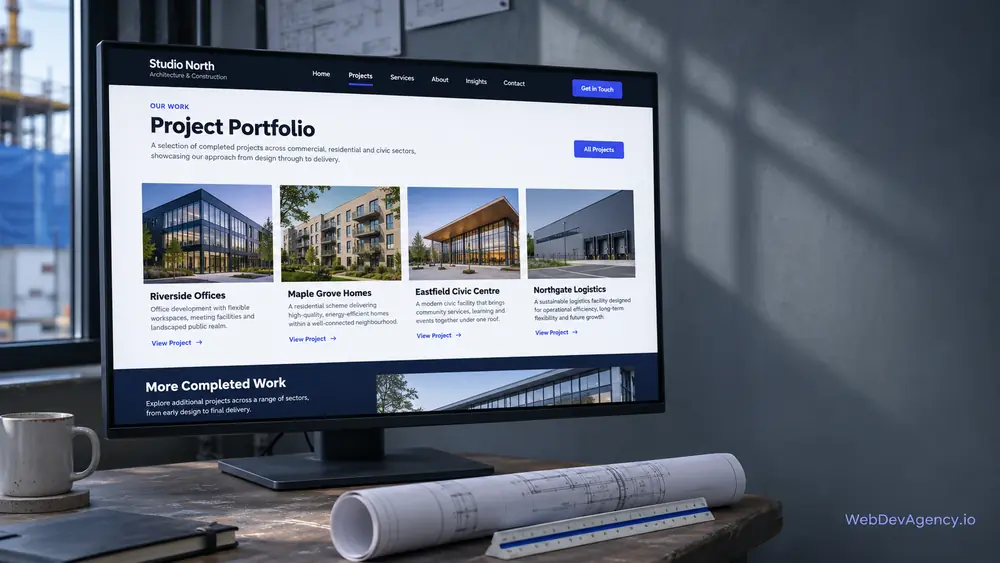
Give every project its own page
A grid of photos with no detail does not help a project owner decide. Give each project a page with:
- The project name and location, if the owner allows it
- The sector, such as healthcare, education, industrial or multifamily
- Your role: general contractor, construction manager, design-builder or subcontractor
- The scope of work in plain language
- Any special conditions, such as an occupied building, phased work or a tight site
- Photos from several stages, not only the finished result
- The architect or design partner, with their permission
Keep descriptions factual. Describe what you did, not what the project "achieved", unless the owner has shared results you can stand behind.
Let visitors filter by sector and service
Owners usually search for experience in their own sector. Add simple filters or category pages for sector, service type and region. A school board member should be able to see only school projects in a couple of taps.
Show the work in progress
Progress photos tell a story finished photos cannot. Steel going up, a phased renovation inside an open hospital wing or a careful tie-in to an existing structure shows how you manage complex work. Pick a few clear images per stage rather than dozens of similar ones.
Ask permission before you publish
Some owners do not want their projects shown, or want names and locations left out. Get written approval before you publish project details or photos, and respect any limits in your contracts. When in doubt, describe the project type and region without naming the owner.
Explain capabilities and sectors
Capability pages are among the most useful construction website design ideas, because they help the right clients find you and the wrong ones move on. Think of them as the pages for the work you want more of.
Service pages for each delivery method
If you offer preconstruction, general contracting, construction management or design-build, give each its own page. Explain what the service includes, when it suits an owner and how your team works with the design side. Many owners are unsure which delivery method fits their project, so plain explanations are genuinely useful.
Sector pages
Create a page for each sector where you have real experience. Explain what is different about building in that sector, such as infection control in healthcare, school calendars in education, or tenant coordination in retail. Then show related projects. A short, specific sector page beats a long generic one.
Self-perform work and equipment
If you self-perform concrete, steel, carpentry or site work, say so. Owners and construction managers often look for this when they compare firms. List the trades you self-perform and the type of equipment you own, without inflating capacity.
Share safety information and credentials you can verify
Safety and credentials matter to owners, insurers and public agencies. This section is about clear, checkable facts, not big claims.
A safety page that explains your program
Describe how your safety program works in practice: who leads it, how crews are trained, how site orientations work and how near-misses are reported. Photos of real toolbox talks or site orientations help.
Avoid vague promises and avoid publishing safety figures unless they are current, accurate and you are comfortable explaining them. If an owner needs specific safety data, offer to send it as part of prequalification.
Licenses, insurance and bonding
State which licenses you hold and where, if your state or city expects them in advertising. Say that you carry insurance and can provide certificates on request. If you are bonded, you can say so, and offer to share bonding details during prequalification. Keep all of this on one page so it is easy to update.
Prequalification made easy
Public agencies and larger owners often send prequalification forms. A "For owners" or "Prequalification" page can list the documents you can provide on request and give a direct contact for that paperwork. This is a small page that can save a lot of back-and-forth email.
Certifications and memberships
Only list certifications, memberships or business designations you hold now and can prove. Link to the issuing body where that is possible. Do not use another organization's logo unless it allows you to.
Make bid requests easy
The bid and contact path is where many construction sites fall short. Different visitors need different forms.
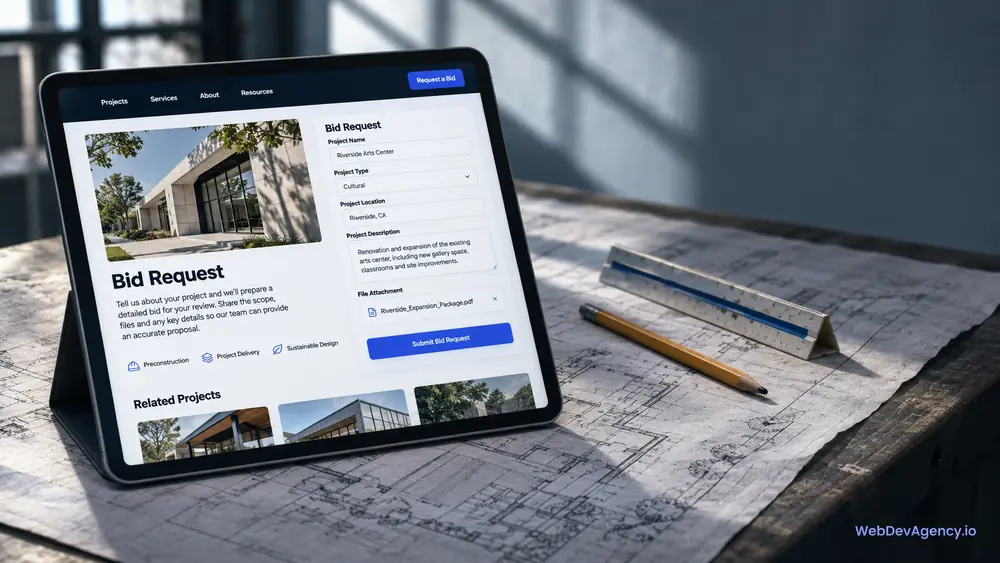
A project inquiry form for owners
Owners with a project in mind need a simple way to reach your business development or estimating team. Useful fields include:
- Name, company and role
- Project type and sector
- Project location
- Current stage, such as planning, design, permitted or ready to bid
- Delivery method, if known
- A short description and a place to attach drawings or a brief
Say who reviews inquiries and what happens next. Put a direct phone number and email for estimating next to the form.
A path for subcontractors and suppliers
Subcontractors want to know how to get on your bid list. A short page can explain your process, link to a vendor registration form and list where you post bid invitations, such as your plan room or bidding platform. If you have supplier diversity goals or programs, describe them accurately.
Current bid opportunities
If you post open bid packages, keep the list current. Remove closed packages promptly and include the bid due information and the contact for each package. An out-of-date list makes the company look disorganized.
Recruiting pages for crews and staff
For many construction firms, hiring is as important as winning work. The website is often the first place a candidate checks.
A careers page that feels real
Show real crews and real job sites. Explain the types of roles you hire for, from apprentices and field trades to superintendents and project managers. Describe training, safety culture and the kind of projects people will work on. Avoid stock photos of people in spotless hard hats.
Easy applications on a phone
Many field candidates apply from a phone. Keep the application short, allow a resume upload but do not require one for every role, and give a phone number for people who would rather call. If you use an applicant tracking system, make sure it looks and works well on mobile.
Benefits and growth, stated plainly
List the benefits you actually offer and how people move up in the company. If you have apprenticeship or training programs, describe how they work. Plain facts are more convincing than slogans.
More construction website design ideas that help
These smaller construction website design ideas make a site feel well run:
- A clear "About" page with leadership, company history told simply and the regions you work in.
- Team profiles for project executives and superintendents who owners will meet.
- A news or updates section for project milestones and community work, kept current or left out.
- Fast pages. Compress large project photos and avoid heavy video on the homepage.
- Accessible design. Readable text, good color contrast and forms that work with a keyboard. We follow WCAG accessibility guidelines, and you stay responsible for your own compliance.
- Location details for each office, with the same name, address and phone number used on your Google Business Profile.
How to put these construction website design ideas into practice
You do not need every idea at once. Here is a practical order of work:
- Decide which sectors and services you want more of.
- Gather project details and photos for your best work in those sectors, with owner approval.
- Write capability and sector pages for that work.
- Set up the owner inquiry form and the subcontractor path.
- Add the safety, credentials and prequalification page.
- Build the careers page if hiring is a priority.
- Review the site on a phone and fix anything slow or hard to tap.
Our construction website design service builds sites for general contractors, builders and specialty firms. We plan the page structure with you, write clear capability pages and set up the forms each audience needs.
At WebDevAgency.io, packages are $199 for Basic, $349 for Standard and $599 for Premium, with a Custom option for larger projects. Firms with large portfolios or custom features get a fixed quote after a short call. Hosting, domain, platform plans and paid plugins are billed separately. See our pricing page for details.
You can learn more about our team and the platforms we build on from the WebDevAgency.io homepage.
Key takeaways
- A construction website serves owners, design partners, agencies, subcontractors and job seekers.
- Detailed project pages with sector, role and scope do more than a photo grid.
- Capability and sector pages should focus on the work you want more of.
- Keep safety, licensing, insurance and bonding information factual and easy to verify.
- Give owners, subcontractors and job seekers each their own clear path.
- Get owner approval before you publish project details or photos.
Frequently asked questions
What should a construction company website include?
A construction company website should include detailed project pages, capability and sector pages, safety and credentials information, and clear contact paths for owners and subcontractors. Many firms also need a careers page. Each section should help one audience decide whether to work with you.
How do I show construction projects on my website?
Give each project its own page with the sector, location, your role, the scope of work and photos from several stages. Add filters so visitors can see projects by sector or service. Get the owner's approval before you publish names, locations or photos.
Should I list safety statistics on my construction website?
Only publish safety figures if they are current, accurate and you can explain them. Many firms describe their safety program on the site and share specific safety data during prequalification instead. That keeps the website simple and keeps detailed numbers in the right context.
How can my website help with subcontractor bids?
Create a page that explains how subcontractors and suppliers get on your bid list. Link to a vendor registration form, explain where you post bid invitations and list a contact for each open package. Remove closed packages promptly so the information stays reliable.
Do construction companies need a careers page?
If hiring is a priority, a careers page is one of the most useful pages on the site. Show real crews and job sites, describe the roles you hire for and make the application easy on a phone. It helps candidates decide before they apply.
Planning a new site for your construction company? Tell us about your sectors, services and hiring goals on our contact page, and we will reply within one business day with a free, fixed-price quote.